Understanding Impressions on LinkedIn and How to Boost Them
Unlock the real meaning behind impressions on LinkedIn. Discover ethical, proven strategies to increase your visibility and grow your professional influence.

Let's get this straight. A LinkedIn impression is counted every single time your content shows up in someone’s feed. That’s it.
Think of it like someone walking past your shop window. They might not stop, they might not come in, but they saw what was on display. It’s a measure of pure visibility, and it's the very first step in figuring out if your content is actually going anywhere.
Your Quick Guide to LinkedIn Impressions
Every professional wants their content to make an impact. On a platform as massive as LinkedIn, just knowing people are seeing your work is the starting point for any real strategy. Before you can get likes, comments, or leads, you have to get seen.
If you're new to this, it's worth getting a handle on the basics—this piece on What Are Impressions is a solid primer. But the core idea is simple: impressions are the most fundamental measure of how many times your post has appeared on a screen.
This metric is critical because it represents the very top of your engagement funnel. Nobody can like, comment on, or share your post if they never see it in the first place. A high impression count is a good sign that LinkedIn’s algorithm is putting your content to work, giving you more chances to connect and build real influence.
The Foundation of Your Visibility
The sheer scale of LinkedIn makes impressions an essential number to watch. As of early 2025, it’s the undisputed king of professional networks, with over 1.2 billion registered members scattered across more than 200 countries.
To put that in perspective, ads on the platform alone can reach about 20.7% of the entire global population with internet access. It’s an absolute powerhouse for professionals and brands, and your content is competing for a slice of that attention every day.
Seeing this logo is a good reminder that behind every impression is a real person—a potential client, colleague, or collaborator whose attention you need to earn.
An impression isn't a success on its own, but it's the prerequisite for it. Without impressions, you get no engagement, no clicks, and no conversions. It's the first domino that has to fall.
Once you truly get this, your focus shifts. You stop just creating content and start creating content that the algorithm wants to show to more people. That's the real game.
Interpreting Your Analytics: Impressions vs. Reach vs. Views
To get the most out of your LinkedIn analytics, you have to understand how the core metrics—impressions, reach, and views—tell a story together. They’re distinct but related, and the nuances are where the real insights live.
Think of your content as a billboard on a busy highway. Impressions are the total number of times cars drive past and see it. One driver might pass your billboard five times on their weekly commute, and each pass adds to your total impression count. It’s a measure of raw exposure.
This is different from reach, which is the number of unique cars that saw your billboard. If that same driver passes by five times, they contribute five impressions but only one to your reach. Reach tells you how many distinct individuals your content has touched.
Then you have views. This metric really only applies to specific formats like videos, documents (like PDFs or carousels), and articles. A view is counted only when someone slows down, pulls over, and actually watches your video for at least three seconds or clicks to read your full article. It signals a much deeper level of interest than a simple glance.
The Story Behind the Numbers
This is where things get interesting. Looking at these metrics in relation to each other is how you start diagnosing what’s working and what isn’t.
For example, if you have sky-high impressions but really low reach, it means the same small group of people are seeing your content over and over again. Your billboard isn't on a major highway; it's on a quiet local road that the same few people use every day.
On the other hand, what if you have high reach but low engagement (like views, comments, or likes)? That points to a different problem. Plenty of unique cars are driving by, but your billboard isn't compelling enough to make them slow down. The message just isn't resonating or grabbing their attention.
This diagram helps visualize how a user moves from just seeing your post to actually engaging with it.
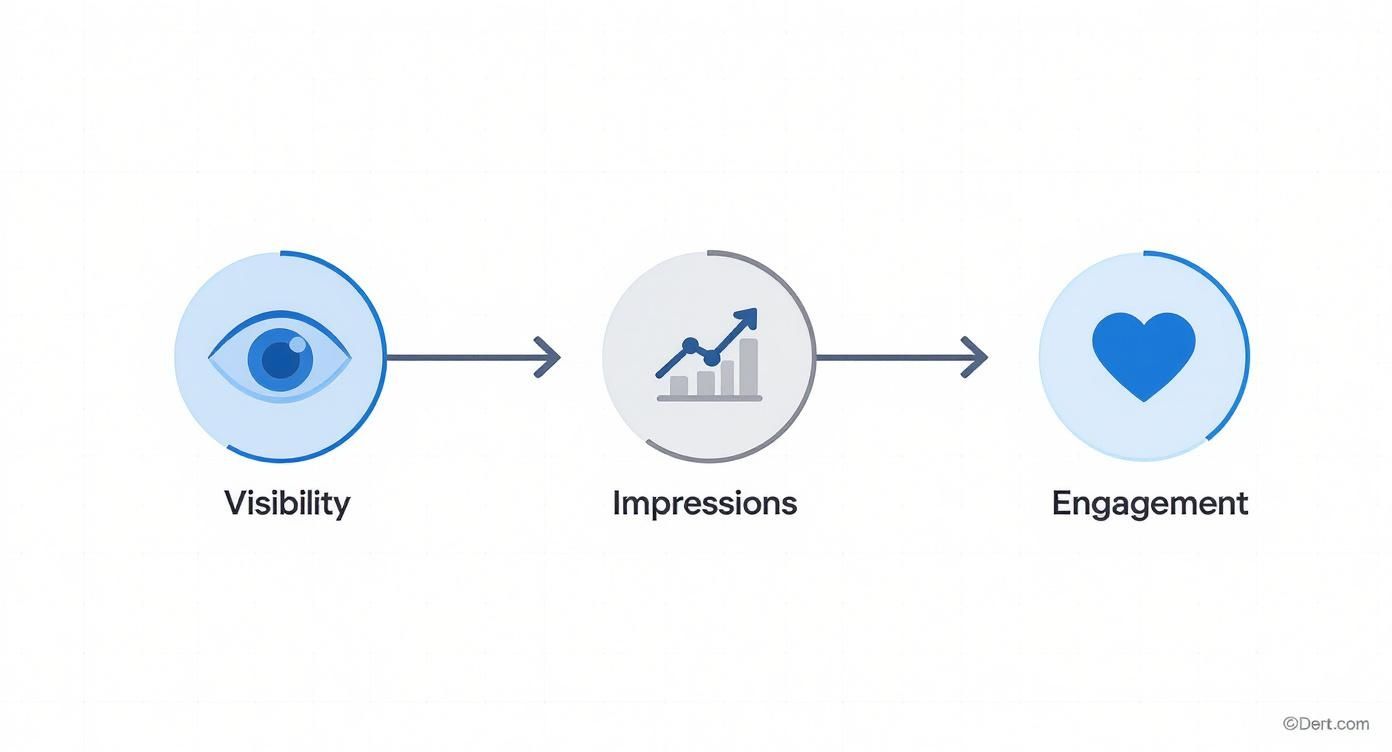
You can see how it’s a funnel. You need high visibility to get impressions, but you need strong content to turn those impressions into action.
Why This Matters for Your Strategy
Analyzing these numbers helps you pinpoint problems without spending a dime on fancy tools. It tells you whether your main goal should be expanding your audience (improving reach) or creating more compelling content (improving views and interactions).
This is especially critical on a platform as active as LinkedIn. The site got around 1.77 billion visits in a single recent month, with 134.5 million people using it daily. It's a bustling place where the right content can catch fire and build momentum fast. You can dig into more of these engagement stats on SproutSocial.com.
By looking at impressions, reach, and views together, you move from simply counting numbers to understanding your content's performance story. This insight is the foundation for any affordable and effective growth strategy.
Finding and Fixing Your Low Impression Issues
It’s easy to get frustrated when your visibility on LinkedIn feels stuck in neutral. But low impressions on LinkedIn aren't a sign that your content is bad—they're just a signal that something needs a small tweak.
Think of it like a radio signal. If you're getting static, you don't throw the radio out. You just adjust the antenna to find a clearer frequency.
Troubleshooting your content performance doesn't mean you need expensive tools or complex software. Most of the time, the fix comes from getting back to basics: what you post, when you post it, and how you grab attention in that first sentence. Let's diagnose the common culprits so you can get your signal broadcasting clearly again.
Issue 1: You Are Posting at the Wrong Time
This one is simple, but so many people overlook it. Timing is everything. You could write the most insightful post in the world, but if you share it when your audience is offline, you're essentially shouting into an empty room.
The goal is to show up when your network is most active, which is usually during business hours. General wisdom points to mid-week mornings (Tuesday–Thursday, 9–11 AM), but your specific audience might have different habits.
The Fix:
- Test and Measure: For a couple of weeks, try posting at different times and on different days.
- Check Your Analytics: Dive into LinkedIn’s analytics to see which posts earned the most impressions.
- Find Your Pattern: Once you spot your personal "peak hours," build a simple schedule around them.
This costs nothing but a little observation, and it’s the easiest, most affordable way to meet your audience where they already are.
Issue 2: Your Content Format Is Misfiring
The LinkedIn algorithm does not treat all content formats the same. A plain text post behaves differently than a multi-image carousel or a native video. If you’re stuck using a format that the algorithm doesn't favor, your impressions will naturally suffer.
For example, we know that posts with images get twice the engagement as those without. We also know that multi-image posts can hit engagement rates over 6%. If you only ever post text, you're leaving a massive advantage on the table.
Your content format is the packaging for your message. The right packaging makes people want to see what's inside; the wrong one gets ignored on the shelf.
The Fix:
Start experimenting with different formats to see what connects with your audience.
- Carousels (PDFs): Perfect for telling a story or breaking down a complex idea into bite-sized steps.
- Multi-Image Posts: Great for showing off event photos or walking through project highlights.
- Polls: An incredible way to spark immediate interaction and get quick feedback.
- Text with one strong image: The classic combo. It balances readability with a powerful visual punch.
Issue 3: Your Opening Line Is Falling Flat
People only see the first one or two lines of your post before they have to click "see more." That opening is your hook. If it's generic, boring, or predictable, they'll just keep scrolling.
A weak hook is a guaranteed way to kill your impressions before your post even gets a chance. It’s your 3-second window to earn someone’s attention ethically.
Your hook has one job: create curiosity, state a bold opinion, or ask a question they can't ignore. While crafting a great opening is a skill, you can get a head start by brainstorming ideas with a quality, affordable hook generator.
7 Ethical Strategies to Boost Your LinkedIn Impressions
Let's get one thing straight: boosting your impressions on LinkedIn isn't about gaming the algorithm or throwing money at ads. It's about earning attention the right way—by providing genuine value to your network.
Think of these seven strategies as your practical playbook for doing just that. Each one is a simple, actionable step you can take today to get more eyes on your work and start better conversations.

1. Craft Irresistible Opening Lines
Your post's first line is its most valuable real estate. Seriously. If it doesn’t immediately spark curiosity or make a bold claim, people will just keep scrolling. You'll get zero impressions from them, and your brilliant insight will go unseen.
To stop the scroll, your hook has to be sharp. Instead of a bland opener like, "I'm excited to share," try a question that makes people pause: "What if everything we know about project management is wrong?" That simple shift invites people to click "see more." If you're stuck, a good headline generator like the one at https://contentide.com/headline-generator can be a lifesaver for brainstorming powerful hooks.
2. Align Content Formats with Your Goals
Not all content formats are created equal on LinkedIn. The platform’s algorithm treats text posts, images, carousels (PDFs), and videos differently, so aligning your format with your message is key to maximizing impressions.
Carousels, for example, are fantastic for breaking down complex ideas into bite-sized slides. Multi-image posts work wonders for showing off event highlights. And polls? They're an almost effortless way to get instant engagement, which signals to the algorithm that your content is worth showing to more people.
We see a lot of different formats work well, but some are definitely better suited for certain goals. Here’s a quick breakdown:
High-Impact Content Formats for LinkedIn
| Content Format | Best For | Impression Potential | Pro Tip |
|---|---|---|---|
| Carousel (PDF) | Educational deep-dives, step-by-step guides, storytelling. | High | Make the first slide a killer headline and visual hook. |
| Text + Image | Sharing personal stories, company news, or quick insights with visual context. | Medium to High | Use a high-quality, relevant image. Avoid generic stock photos. |
| Polls | Quick engagement, market research, starting a conversation. | High | Keep the question simple and the options clear. Follow up in the comments. |
| Video | Demonstrations, interviews, personal brand building, behind-the-scenes content. | High | Add captions! Most users watch videos with the sound off. |
| Text-Only Post | Storytelling, asking questions, sharing a strong opinion or "hot take". | Medium | Break up long text with short paragraphs and use strategic bolding. |
The takeaway here is simple: don't just stick to one format. Mix it up to see what your audience loves. A varied approach keeps your feed interesting and your engagement numbers healthy.
3. Use Hashtags to Join Conversations
Think of hashtags as signposts for your content. They tell LinkedIn what your post is about and help the right people find it. The best approach is to use a mix of broad, niche, and branded hashtags to expand your reach.
Aim for 3-5 highly relevant hashtags per post. That’s the sweet spot.
- Broad: #Marketing, #Leadership
- Niche: #ContentStrategy, #B2BLeadGen
- Branded: #YourCompanyName
This strategy helps you show up in big, high-traffic conversations while also making a mark in smaller, more targeted discussions where you can really stand out.
4. Find Your Audience's Active Hours
This one feels obvious, but it's powerful. Posting when your target audience is actually online and scrolling is a simple, no-cost way to get a big initial boost in impressions.
While general advice often points to mid-week mornings, your ideal time depends entirely on your network. Pay attention to your analytics and see when you get the most traction. A robust content calendar is a must-have for planning this out. If you need help, there are great resources on creating a LinkedIn content calendar that can walk you through the process.
5. Ask Questions That Invite Responses
Want to get a post seen by more people? Get comments on it. The algorithm views comments as a strong sign of quality content and will reward you with more visibility. The easiest way to get comments is to just ask a direct question.
But avoid simple "yes/no" questions. Instead, ask open-ended questions that get people thinking. "What's the biggest challenge you're facing with remote team management?" will get you much more thoughtful replies than "Do you like remote work?"
6. Tag Others Thoughtfully to Add Value
Tagging other people or companies can be a huge impression-booster, but you have to do it ethically. Don't just spam tags for attention.
Only tag people who are genuinely relevant to the content. A perfect example is tagging a speaker from an event you attended and sharing a key takeaway from their talk. It adds value for your audience and brings the person you're mentioning into the conversation respectfully.
7. Use Comments to Build Your Presence
Your activity on LinkedIn shouldn't end when you hit "post." One of the most underrated ways to increase your own visibility and impressions on LinkedIn is by leaving thoughtful comments on other people's content.
When you add real value to a conversation, others will notice. They’ll click on your profile, which leads to more followers and more eyes on your content down the line. In a professional network that's growing at an incredible pace, every thoughtful interaction is a chance to be seen.
Benchmarking Success with Your Impression Rate
So, you're putting in the work to boost your impressions on LinkedIn. Great. But it always leads to the next big question: what’s a “good” number, anyway?
The honest answer? There isn't one.
Comparing your impression count to a marketing influencer with 100,000 followers is like a local coffee shop comparing its daily sales to Starbucks. Their scale, audience, and goals are in a completely different universe. Chasing someone else's vanity number is a surefire way to get frustrated, and it rarely leads to real results.
Instead of looking over your shoulder, the smartest move is to look in the mirror. Success isn’t about hitting some random industry benchmark; it’s about consistent, measurable improvement against your own past performance. This is where your personal impression rate becomes your most valuable KPI.
Calculating Your Personal Post Impression Rate
To get a real sense of how your content is performing, you need a metric that’s relative to your network size. It's a simple, no-cost way to track what's working without getting lost in the comparison game.
The formula is dead simple.
Post Impression Rate = Total Impressions on a Post ÷ Your Total Follower Count
Let's say you have 500 followers and a recent post got 750 impressions. The math looks like this:
- 750 Impressions ÷ 500 Followers = 1.5
That means your post’s impression rate is 150%. Any rate over 100% is a fantastic sign. It tells you the post broke out of your immediate network and was shown to new people. This one number gives you a consistent way to measure the viral potential of your content, post after post.
Setting Achievable Benchmarks for Growth
Once you start calculating this for every post, you can stop guessing and start setting real goals. You’re no longer playing the vanity game; you're playing to beat your own high score.
- Establish a Baseline: First, calculate the average impression rate for your last 10 posts. That’s your starting line.
- Set a Modest Goal: Now, aim to increase that average rate by 10-15% over the next month. Small, consistent wins are the key.
- Analyze and Adjust: Look at your top-performing posts—the ones with the highest rates. What did they have in common? Was it the format? The topic? The hook? Double down on what works.
This process gives you the power to focus on what actually connects with your audience. For professionals seeking affordable ways to manage their social media efficiently, you can learn more about how different tools compare to help you on this journey. By tracking your own impression rate, you build a clear, honest picture of your progress and make sure your time on LinkedIn is actually paying off.
Common Questions About LinkedIn Impressions
Even with a solid grasp of the basics, a few specific questions always seem to pop up. Let's tackle them head-on. Think of this as the final piece of the puzzle—clearing up these common sticking points will help you master your LinkedIn analytics with total confidence.
These are the details that can make a huge difference in how you read your data and tweak your strategy.
Do My Own Views Count as Impressions on LinkedIn?
This is easily the most common question I hear, and the answer is a simple, straightforward no. Your own eyeballs on your own posts don't add to your impression count.
LinkedIn’s analytics are built to measure how many times your content shows up for other people. It’s a measure of your external impact, not how many times you admire your own handiwork. This ensures the data is a true reflection of your content's visibility across the network.
What Is the Difference Between Feed and Profile Impressions?
It's easy to mix these up, but they tell two very different stories about your presence on LinkedIn.
- Feed Impressions: This is all about your content. It counts how many times your posts, articles, or carousels appeared in someone else's news feed as they were scrolling. This metric is a direct report card on how well your content strategy is working.
- Profile Impressions: This number tracks how many times someone landed on your actual profile page. It signals a deeper interest in you as a professional. People usually end up here after finding you in a search, seeing one of your comments, or clicking through from a piece of your content that caught their eye.
In short: feed impressions measure your content's reach, while profile impressions measure interest in you as a person. Both are valuable, but they track different things.
How Long Does the LinkedIn Algorithm Take to Promote a Post?
The algorithm gets to work the second you hit "post," but the first 60 to 90 minutes are absolutely critical. This is often called the "golden hour."
During this window, LinkedIn pushes your post to a small test audience within your network. If that initial group engages—liking, commenting, and sharing—it sends a powerful signal to the algorithm that your content is high-quality. A strong start here encourages LinkedIn to push it out to a much wider audience, which is how you see those big impression spikes.
Is It Better to Have More Impressions or More Engagement?
This is a classic "it depends" scenario. One isn't necessarily better than the other; they just serve different purposes. High impressions are fantastic for building broad brand awareness and just getting your name out there. It’s all about visibility at scale.
High engagement, on the other hand, is what builds community, trust, and real relationships. The sweet spot is a healthy mix of both. If you're getting tons of impressions but almost no engagement, it’s a sign that your hook might be grabbing attention, but the content itself isn't compelling enough to make people stop and join the conversation. The most ethical approach is to aim for both: catch attention and then deliver genuine value.
Ready to stop staring at a blank page and start posting content that gets noticed? Contentide is an AI-powered content generator designed for busy professionals. It helps you create authentic, high-performing LinkedIn posts in minutes, so you can build your network and boost your impressions consistently. Try it for free and see the difference at https://contentide.com.
Hope you found this helpful. Feel free to share your thoughts.