LinkedIn Impressions Meaning A Guide to Getting Seen
Unlock the true LinkedIn impressions meaning. Learn how this key metric works, why it matters, and affordable strategies to increase your visibility.

Ever wondered if your content is actually being seen on LinkedIn? That’s the question impressions answer.
Think of impressions as the digital equivalent of foot traffic past a storefront. Every time someone scrolls by and your post appears on their screen—even for a split second—that’s one impression. It’s the very first signal you have that you’re visible on the platform.
An impression is counted every single time your post, article, or video shows up in a LinkedIn member's feed. They don't have to click, like, or even pause. The content just has to be there.
This metric is the foundation of your entire content strategy. Before you can get likes, comments, or clicks, people first need to see what you’ve shared. A high impression count is a good sign that the LinkedIn algorithm is pushing your post out, giving you a shot at making an impact.
For anyone trying to grow their presence or business without a massive ad budget, impressions are the starting line. They measure the potential size of your audience and the initial blast radius of your message, proving you don't need to spend a fortune to be seen.
How LinkedIn Counts an Impression
So, what does it take for LinkedIn to officially count an impression?
It’s pretty simple: a post is counted as "viewed" once it has been visible on a user's screen for at least 300 milliseconds. On a platform with over 1.15 billion members globally, that tiny window of time adds up fast.
If your post has 1,000 impressions, it means it was displayed in someone's feed 1,000 times. This is a pure visibility metric, making it crucial for measuring brand awareness.
The key takeaway here is that an impression is counted once the content is loaded and at least partially visible. To dive deeper into how this fits into a broader analytics plan, you can explore more insights about tracking LinkedIn metrics.
The Three Types of Impressions
Not all impressions are created equal. Understanding where they come from is key to building a smart, ethical content plan. They fall into three main buckets:
Organic Impressions: These are the views your content earns naturally through trust and value. They come from your direct followers, their connections (your 2nd-degree network), and people who find your post through hashtags or groups. This is the bread and butter of your content engine.
Paid Impressions: Just like it sounds, these are the impressions you pay for through LinkedIn Ads. While a powerful tool, it's a way to guarantee visibility to a highly targeted audience that might be outside your organic reach.
Viral Impressions: This is where the magic happens. Viral impressions occur when your content gets shared or heavily engaged with because it genuinely helps people, causing it to pop up in the feeds of people way beyond your immediate network. This is the most powerful and authentic form of organic growth.
To make this even clearer, here's a quick breakdown of what you'll see in your analytics and what it means for your strategy.
A Quick Guide to LinkedIn Impression Types
| Impression Type | What It Means | Primary Source |
|---|---|---|
| Organic | Views earned ethically through your own network and valuable content. | Followers, 2nd/3rd degree connections, hashtag/group discovery. |
| Paid | Views you purchased via targeted advertising campaigns. | LinkedIn Ads platform. |
| Viral | Views generated from shares and high engagement, spreading beyond your network. | Shares, reshares, and high-velocity likes/comments. |
Knowing the difference helps you diagnose your content's performance. Are you getting lots of organic impressions but no viral lift? Your content might be solid but isn't sparking enough conversation to spread. All paid and no organic? It’s time to focus on an affordable, foundational content strategy.
Impressions vs. Reach vs. Engagement Explained
To really get what LinkedIn impressions are all about, you have to see how they fit with two other critical metrics: reach and engagement. These three metrics are a package deal—they tell the complete story of your content's performance. One of the most common mistakes I see is people mixing them up or only focusing on one.
Let's break it down with a simple analogy. Imagine you’re on a busy street corner handing out flyers for a workshop you're hosting.
- Impressions: This is the total number of flyers you hand out. If you give away 500 flyers, that’s 500 impressions. Simple. If the same person walks by, takes a flyer, then comes back an hour later and takes another one, you just racked up two impressions.
- Reach: This is the number of unique people who took a flyer. You handed out 500 flyers, but maybe only 400 different people actually took one. In that case, your reach is 400.
- Engagement: This is the number of people who actually do something after getting your flyer. They stop to ask a question, scan the QR code to sign up, or show up at your workshop. That's engagement.
On LinkedIn, this concept translates directly. Impressions are the total times your post is displayed in a feed. Reach is the number of individual people who see it. Engagement is all the likes, comments, shares, and clicks it gets.
Why This Distinction Matters
Understanding the relationship between these metrics is your key to diagnosing what’s working and what isn't. High impressions but super low reach? That probably means the same small group of followers is seeing your content over and over. That's not always bad, but it tells you you're not breaking into new networks.
On the other hand, if you have high reach but low engagement, your content is getting in front of a lot of eyeballs, but it isn't compelling enough to make them stop scrolling and take action.
Key Takeaway: Impressions measure total visibility, reach measures audience size, and engagement measures impact. Looking at them together gives you the real picture of how effective your content truly is.
I know it’s tempting to dismiss impressions as just a vanity metric, but they directly influence how often your content gets a boost from LinkedIn’s algorithm. This is exactly why it’s so important to understand the different types of impressions—organic, paid, and viral.
This diagram helps visualize how impressions break down, from the main "eyeball" icon representing all views down to the specific sources they come from.
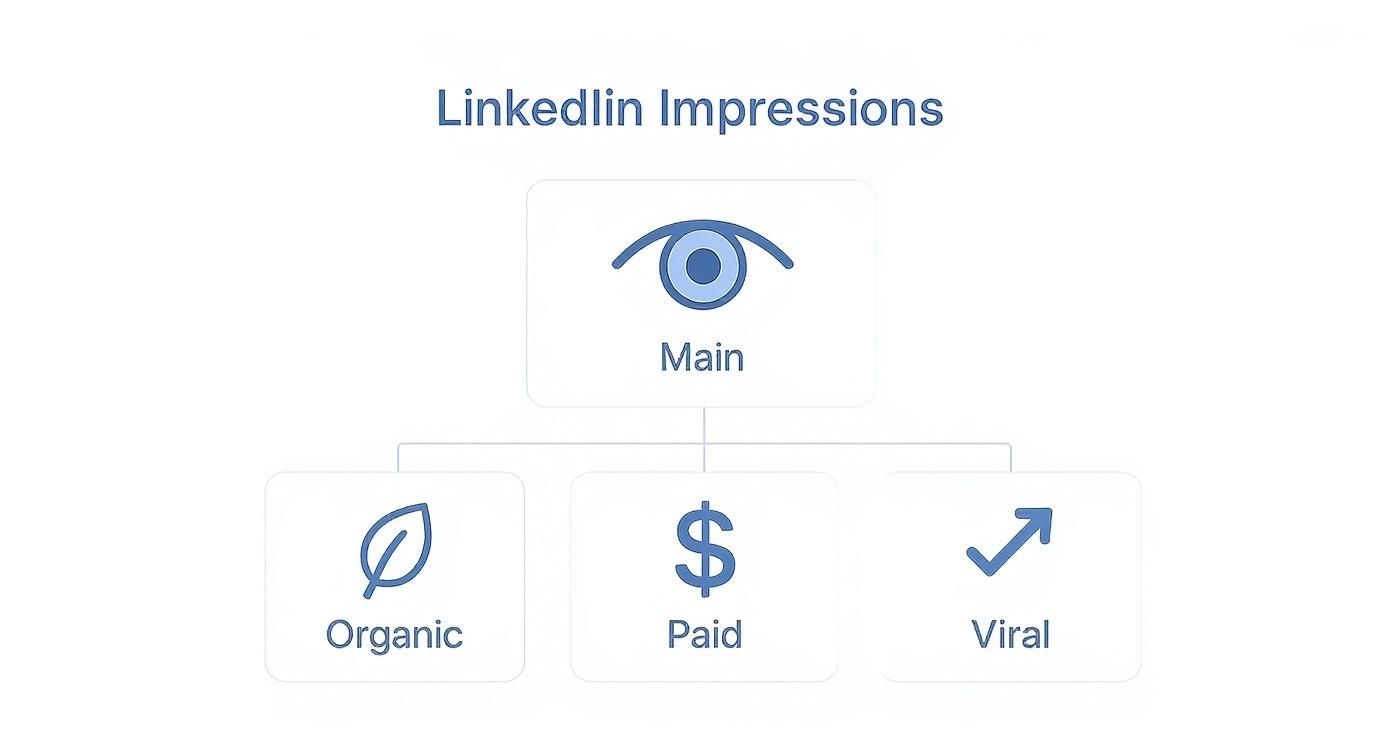
As you can see, organic and paid impressions are your baseline. But viral impressions? That’s where exponential growth happens. The data is pretty wild: only about 1% of LinkedIn’s monthly users actively share content, yet they are responsible for generating billions of impressions.
And on the paid side, things are growing too. In 2024, LinkedIn ads saw a 2.8% increase in ad reach compared to the previous quarter, which shows how paid campaigns are being used to deliberately expand that initial visibility. You can read more about these LinkedIn statistics to see just how powerful the platform has become.
To make this even clearer, let's put these core metrics side-by-side.
LinkedIn Metrics Compared: Impressions vs. Reach vs. Engagement
This table breaks down the fundamental differences between the three most important LinkedIn performance metrics.
| Metric | What It Measures | Real-World Analogy |
|---|---|---|
| Impressions | The total number of times your content was displayed in someone's feed. | How many flyers you handed out in total on a street corner. |
| Reach | The number of unique people who saw your content. | How many different individuals received one of your flyers. |
| Engagement | The number of interactions (likes, comments, shares, clicks) your content received. | The people who stopped to talk, scanned your QR code, or attended your workshop. |
Each metric gives you a different piece of the puzzle. Impressions tell you about your content's visibility, reach tells you about its spread, and engagement tells you about its impact. You need all three to get the full story.
How to Find and Analyze Your Impression Data
Okay, knowing the theory is great, but it's useless if you can't find and make sense of your own data.
Luckily, LinkedIn makes it pretty easy to dig into the numbers for both your personal profile and your company page. This is where abstract concepts turn into real, actionable insights. Let's walk through where to find this stuff and what you should be looking for.
Locating Your Data on a Personal Profile
For your personal account, the data is right there on each post. No need to hunt through complicated dashboards for a quick performance check.
- Go to your profile and scroll down to the Activity section.
- Click on Posts to see a list of everything you've shared.
- Right underneath each post, you'll spot a tiny graph icon next to a number labeled "impressions" or "views."
This instant feedback is gold. It lets you see what's getting traction in near real-time and is the fastest way to gauge the immediate visibility of your content.
Analyzing Company Page Analytics
For a Company Page, LinkedIn gives you a much more powerful analytics suite. This is where you can uncover deeper trends about your audience and content.
Just head over to your Company Page, click the Analytics tab, and then select Updates. This dashboard gives you a much richer view of how your posts perform over their entire lifecycle.
You'll see charts tracking impressions over time, which helps you spot patterns. You might notice, for example, that posts published on Tuesday mornings consistently get 20-30% more impressions than those you share on a Friday afternoon.
This is the kind of data that helps you stop guessing and start building a smart posting schedule. As you dive into your impression data, it's also a good idea to understand how to measure social media engagement, since these metrics work hand-in-hand.
The chart below gives you a classic look at impression data over a set period.
This kind of visual makes it easy to spot the spikes that usually line up with your biggest hits. Digging into those peaks is how you figure out what truly connects with your audience—from the topic you chose to the format you used. This is how you uncover the real linkedin impressions meaning within your own strategy.
Affordable Strategies to Increase Your Impressions
Knowing what impressions are is one thing, but making that number climb is the real goal. The great news? You don't need a massive ad budget to get more eyes on your content. The most sustainable growth comes from smart, ethical strategies centered on giving real value.
The core idea is simple: LinkedIn’s algorithm rewards content that keeps people on the platform. Your job is to create posts that stop the endless scroll, spark a conversation, and get people to stick around for a minute.
Every like, comment, and share is a signal to the algorithm that your post is worth showing to more people. When someone engages, LinkedIn shows it to their connections, kicking off a ripple effect that turns a small initial audience into a much larger one.
Master the Fundamentals of Content Creation
Before you worry about hashtags or the "perfect" time to post, you have to get the content itself right. The substance and structure of your posts are what truly earn impressions.
It all starts with the hook. Your opening line is your first—and often only—chance to grab someone's attention. A powerful hook stops scrollers dead in their tracks. To get some inspiration, our Headline Generator can help you craft titles that are too good to ignore.
Next up is readability. Nobody wants to squint at a giant wall of text on their phone.
- Use Short Sentences and Paragraphs: Break your ideas into small, digestible chunks. Posts with shorter sentences (under 12 words) can see a performance bump of up to 20%.
- Incorporate White Space: Be generous with line breaks. It creates a clean, inviting layout that makes your content feel less intimidating to read.
- Leverage Emojis and Bullet Points: These little visual cues help guide the reader's eye and make your key points pop.
Post length also matters. Research suggests the sweet spot is between 900 and 1,200 characters. And be careful with external links—they can slash your reach by 40–50% on personal profiles. It’s all about finding a balance between providing value and keeping people on LinkedIn.
Optimize Your Posting Strategy
Once your content is solid, consistency and timing are your best friends. Posting when your network is most active gives your content the best possible launchpad.
While every audience is unique, general peak times on LinkedIn tend to be Tuesday through Thursday mornings. Experiment with different days and times to see what works for your followers, then build a consistent schedule around those insights.
Hashtags are another key tool for discovery. Think of them as topic labels that help LinkedIn categorize your post and show it to the right people.
Stick to a mix of 3-5 relevant hashtags. Combine broader industry tags (like #Marketing) with more specific, niche ones (like #B2BContentStrategy) to attract both a wide audience and a highly targeted one. And if you need a hand creating quality content efficiently, a LinkedIn Post Generator can be a huge help.
Finally, engage with every single comment you receive. Responding not only helps build a community around your content but also signals to the algorithm that your post is generating a valuable discussion, giving it an extra push in the feed.
Common Mistakes That Sabotage Your LinkedIn Visibility
Knowing what to do is only half the battle. Sometimes, the biggest wins come from knowing what not to do. I see it all the time: smart professionals share fantastic insights but make a few critical mistakes that quietly kill their reach.
Think of it like driving with the emergency brake on. You can have the best content in the world, but if you're making these common errors, you're fighting an uphill battle. Let's shine a light on these hidden traps and, more importantly, how to sidestep them so your work gets the attention it deserves.
The Overly Promotional Trap
This is one of the fastest ways to lose your audience. Nobody logs onto LinkedIn to be sold to. When your feed becomes a constant sales pitch, people don't just scroll past—they learn to ignore you completely. The algorithm picks up on this, too.
Posts that scream "buy my product!" or "hire me now!" can see their performance tank by up to 75%. The solution isn't to stop promoting entirely; it's to shift your mindset from selling to serving.
- The Fix: Live by the 80/20 rule. Make 80% of your content about giving value away for free—share your expertise, teach something new, start a conversation. Reserve that last 20% for your more direct "asks." This simple, ethical balance builds trust and keeps people coming back for more.
The Inconsistent Posting Ghost
Ever see someone post a brilliant piece of content, and then they just… disappear for three weeks? The LinkedIn algorithm favors consistency. Sporadic posting sends a signal that you aren't a reliable voice on the platform, making it tough to build any real momentum.
When there's no rhythm to your posting, you effectively reset your visibility with every new post instead of building on the success of the last one. You're starting from scratch every single time.
The Fix: Create a simple, sustainable content calendar. You don't need to post every day. Find a pace you can stick to, whether it's two or three high-quality posts per week. Consistency trains both the algorithm and your audience to look forward to what you have to say.
The External Link Penalty
LinkedIn has one primary goal: keep users on LinkedIn. When your post's first and only job is to send someone to an external website, you're working directly against that goal. As a result, the algorithm often suppresses the reach of posts with external links right in the main text.
It’s a frustrating reality, especially when you want to share a great blog post or company announcement. While the exact penalty varies, some have seen reach drop by as much as 40-50% on their personal profiles for doing this.
- The Fix: Put the link in the first comment, not the post itself. Just add a simple line at the end of your post like, "You'll find the link to the full article in the comments." This strategy gives the algorithm what it wants (keeping users on-platform) while still guiding your audience to your resource. It's a simple change that makes a huge difference.
Turning Impressions Into Meaningful Connections
Knowing what LinkedIn impressions are is just step one. The real magic happens when you turn those fleeting glances into something more meaningful. Impressions are the very top of your funnel—the first spark of visibility. Think of them as the digital handshakes that open the door to deeper interactions like reach and genuine engagement.
Here’s an analogy: impressions are the invitations you send out for a party. Connections are the actual conversations that happen once people arrive. Your goal should be to convert those initial glances into lasting professional relationships.
This mindset shifts you from just collecting numbers to building a vibrant, active community around your expertise. The true value isn't in how many people see your content, but in how many people truly connect with it.
The ultimate goal is to use your visibility to provide real value, spark discussions, and achieve your professional objectives. It’s about impact, not just eyeballs.
From Visibility to Value
With a clear strategy and consistent effort, you can make every single impression count. Focus on creating content that genuinely serves your audience, apply the best practices we've discussed, and keep an eye on your analytics to see what's hitting the mark.
It all starts with a compelling opening. A strong hook is absolutely essential for stopping the scroll. You can get ideas from a quality LinkedIn hook generator to make sure your posts grab attention right from the first line.
By doing this, you'll move beyond the simple definition of LinkedIn impressions and start building a presence that drives real-world results.
Frequently Asked Questions About LinkedIn Impressions
Even with the basics down, a few specific questions always seem to pop up. Let's tackle some of the most common ones so you can move forward with total clarity.
Are Impressions Different for Personal and Company Pages?
While the technical definition of an impression is the same everywhere, the strategy for earning them is completely different. Company Pages often need a little help to get going, usually through employee advocacy or affordable paid ads, because their organic reach can be a tough nut to crack.
On the other hand, an active personal profile can pull in a ton of impressions just by showing up, networking authentically, and engaging consistently. The trick is knowing which playbook to run for which type of page.
How Long Does It Take to Increase Impressions?
There's no magic timeline, but one thing is certain: consistency is everything. If you stick to the simple best practices in this guide—like posting valuable stuff a few times a week and actually talking to people in your network—you should see a real upward trend in your average impressions within 4 to 6 weeks.
The aim isn't a one-hit wonder. It's about building steady, sustainable growth on a solid content foundation. For more ideas on building that consistency, check out the other guides on the Contentide blog.
Can I Have More Impressions Than Followers?
Yes, absolutely—and when this happens, it’s a fantastic sign that your content is hitting the mark! It means your post has broken out of your immediate circle and is reaching people who don't follow you yet.
This is that "viral" effect everyone talks about. It happens when your followers share your post, the algorithm decides it's good enough to show to new audiences, or people find it through hashtags. It’s the ultimate proof that what you're saying is valuable enough to travel.
This is what a great content strategy is all about: turning your profile from a simple megaphone into a real conversation starter in your industry.
Ready to turn your ideas into high-impact LinkedIn posts that earn more impressions? Contentide helps you create authentic, engaging content in minutes, so you can build your personal brand without the stress. Try Contentide for free and see the difference.
Hope you found this helpful. Feel free to share your thoughts.